
Cracking the Code: Communicating Core Web Vitals to Clients in Layman's Terms

Everyone loves a fast website, and there are different motivations for that obsession with speed.
Users want a smooth experience;
Developers want to create a fast website;
Website owners benefit from satisfied visitors;
Google wants to lead users to a good experience
However, the different perspectives of each of these groups can present challenges, especially for developers talking with their clients. Imagine a developer excited to make a website super fast meets a client who wants a beautiful, functional site. The developer starts talking about things like Core Web Vitals, LCP, INP… and the glaze begins to form in the client’s eyes. This mismatch of perspectives is what developers often struggle with when discussing speed with their clients.
This article helps developers communicate the importance of Core Web Vitals to their clients in an easy and meaningful way.
Core Web Vitals
Naturally, many factors influence the speed of a website. Google has identified three primary or ‘core’ metrics that contribute most to a good user experience. These are collectively called ‘Core Web Vitals’.
What Are Core Web Vitals?
Core Web Vitals (CWV) is the collective term for three speed-related factors that contribute to a good user experience. Specifically, these metrics are:
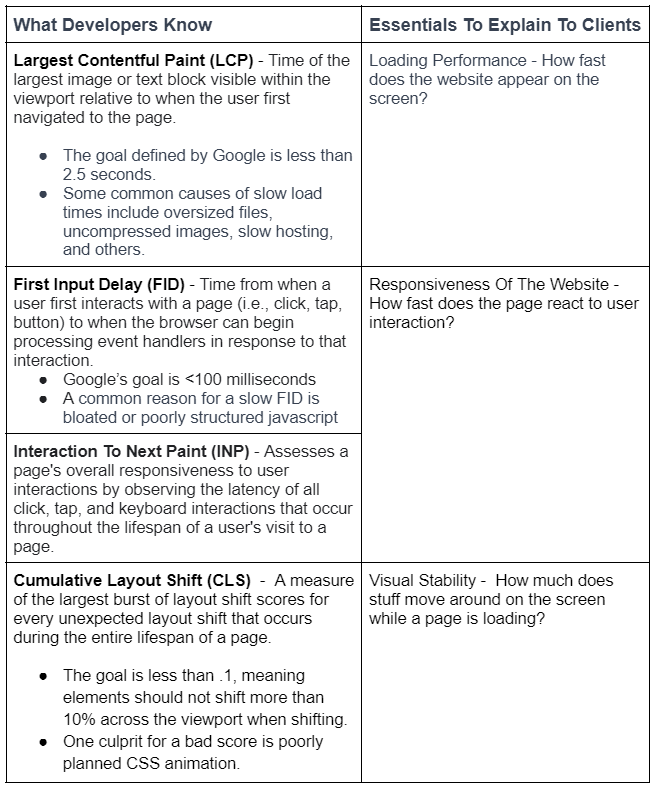
Largest Contentful Paint (LCP) - measures time to load primary page elements
First Input Delay (FID) - measures speed of user interactions (note that FID will be replaced by a similar metric, ‘Interaction To Next Paint’ (INP) as a CWV).
Cumulative Layout Shift (CLS) - measures the amount of movement of elements as page content loads.
While developers will consider much more detailed and technical definitions of these CWV metrics, they’re a good starting point when it comes to talking with clients in layman’s terms.
Why Clients Should Care
Web development clients generally want a website that works smoothly, looks good, and ranks well on Google. It’s that first ‘works smoothly’ quality where the speed-related factors contribute to what Google calls ‘a good page experience - a priority in determining search results ranking.
Website owners should also understand the potential consequences of a slow site. Google reports that if the page does not load in under three seconds, 53% of users will back out of the site immediately (1). In other words, the longer it takes your site to load, the more likely it is your visitors will abandon your site and find your competitors.
Finally, while CWV is a ranking factor for Google (2), it’s not the only consideration. Relevant content is also important for search rankings. A highly relevant but slower page will usually outrank a fast but less relevant page.
So the simple goal for a good user experience is a combination of highly relevant content and great speed, as measured by CWV.
Clients May Use The Same Tools You Do
Developers are likely familiar with several tools for assessing CWV, including:
PageSpeed Insights
Google Search Console
GT Metrix
Lighthouse
… and more
The first tool, PageSpeed Insights, offers a friendly interface with numerical scores and color-coded graphics indicating pass or fail outcomes. Its straightforward presentation allows non-technical clients to easily view metrics of their site and see the pass/fail conclusions. However, when discussing these scores with their developer, website owners likely won’t grasp the technical concepts and jargon. Therefore, developers need to switch to simpler language when explaining scores and suggesting improvements to clients.
Addressing Client Concerns
When clients view results from a tool like PageSpeed Insights they may view any score below 100% as less than ideal. While it’s important to acknowledge the concerns, developers may need to educate their clients about the scores and what Core Web Vitals mean concerning their particular website.
Validating Core Web Vitals Scores
When a client questions, "Why is my website slow?" it's important to verify their concern. They may not know that most CWV tools almost certainly deliver an imperfect score. Whether it's a slight difference between 95% and 100% or a genuinely poor score, validating its legitimacy is essential.
The scores may also be inconsistent. PageSpeed metrics rely on aggregate user data, meaning experiences can vary across locations and devices. These metrics fluctuate due to server load, routing, and overall traffic among other factors. To ensure accuracy, running multiple tests at various times and averaging the scores is helpful (3). If the client's 'failed' score is genuine, researching the contributing factors will be necessary.
Speed Meets Functionality
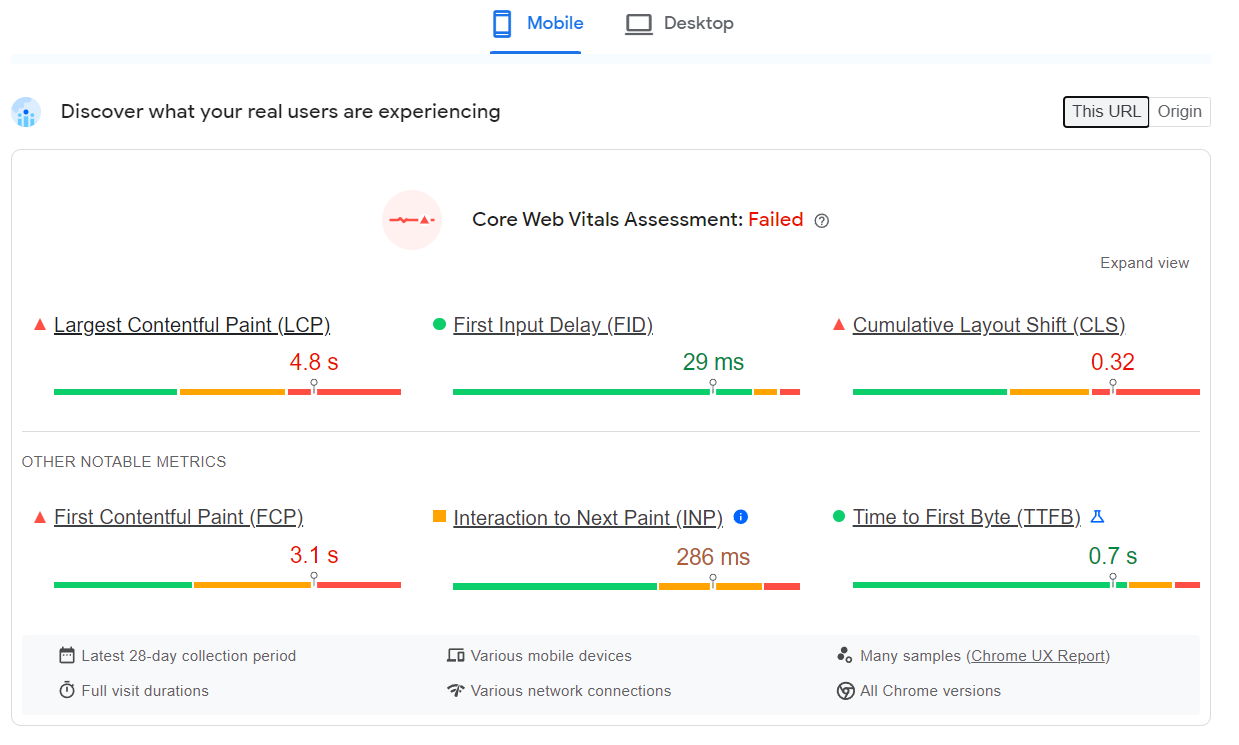
Visitors aren't concerned about your Google PageSpeed Insights score; they just want quick access to your content - a ‘good experience’. The value of PageSpeed Insights is not so much the score it delivers as the way it helps pinpoint issues to optimize and enhance both actual and perceived loading times. Also, not every site can achieve 100% while delivering the most important content. For instance, even Google's YouTube doesn't meet all Core Web Vitals criteria.
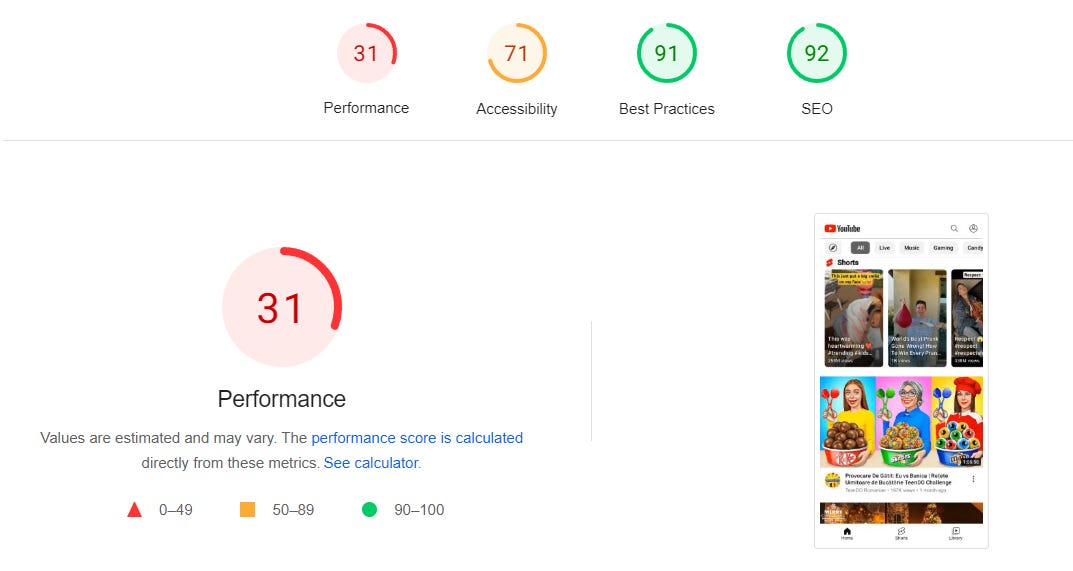
YouTube fails the PageSpeed Insights test.
Speaking To Clients In Plain English
Developers may know all about the technical aspects of CWV and the specific sections of code that affect the reported scores. And they also know additional resources useful in analyzing and correcting particular speed issues. For example, web.dev discusses reconciling field data with lab data in analyzing INP metrics (4). But the average website client doesn’t want to hear about that. They just want you to make their site faster (or explain why it’s already fast enough).
Technical Jargon To Layman’s Terms
To communicate effectively with clients developers need to filter the technical jargon that’s likely on the tip of their tongue. Here are some essential concepts:
In addition to communication style, enhancing client confidence involves directly tackling their questions. Setting clear expectations and providing regular updates also helps them trust in your expertise.
Use Your Developer Expertise To Your Advantage
Website clients may not know about Core Web Vitals and the many associated painful acronyms. However, this knowledge gap is precisely where a developer's role shines. Communicating in clear language helps the client understand and can build their confidence in the relationship.
Citations:
Shellhammer, A. (2016, September 8). The need for mobile speed. Google. https://blog.google/products/admanager/the-need-for-mobile-speed/#:~:text=53%25%20of%20visits%20are%20likely,than%203%20seconds%20to%20load&text=One%20out%20of%20two%20people,in%20less%20than%202%20seconds&text=46%25%20of%20people%20say%20that,the%20web%20on%20mobile%20devices
The role of page experience in creating helpful content | Google Search Central Blog | Google for Developers. (n.d.). Google for Developers. https://developers.google.com/search/blog/2023/04/page-experience-in-search
Briones, J. (2023, March 30). How much does PageSpeed fluctuate? InMotion Hosting Support Center. https://www.inmotionhosting.com/support/edu/wordpress/performance/how-much-does-pagespeed-fluctuate/#case-study
Optimize interaction to next paint. (2023, May 19). web.dev. https://web.dev/articles/optimize-inp